
相关组件安装go-mysql-es同步工具
商品搜索(2)
课程内容
- elasticsearch花式查询
- 索引商品
- elasticsearch与mysql数据同步
1. elasticsearch花式查询
1.1 ik分词器的安装
- 获取ik分词器安装包:https://github.com/medcl/elasticsearch-analysis-ik/releases/tag/v7.12.1
wget https://github.com/medcl/elasticsearch-analysis-ik/releases/tag/v7.12.1
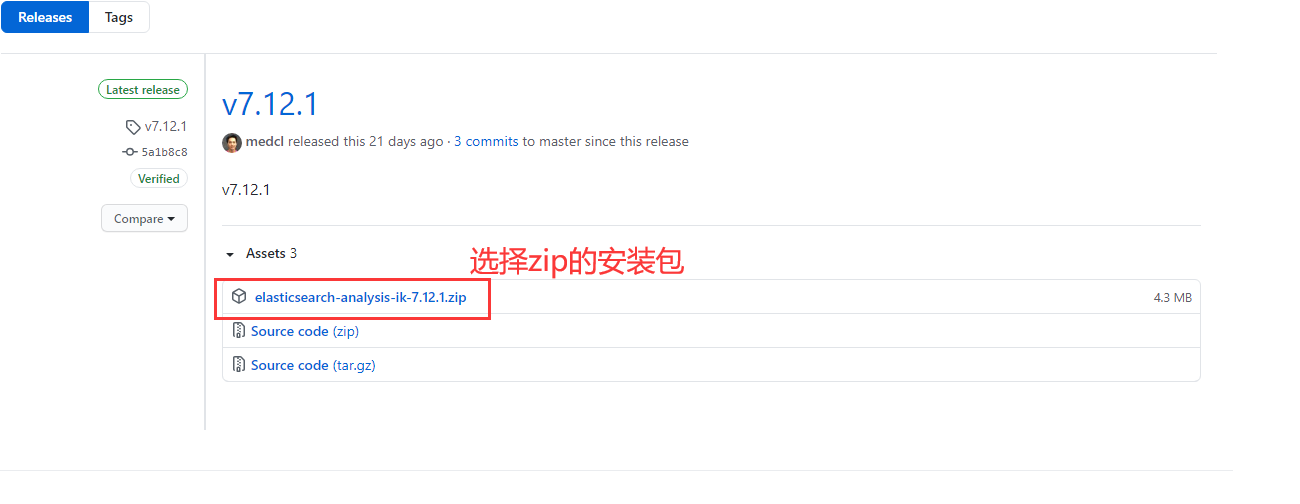
- 进入es的组件目录并解压压缩包
cd /docker/es/plugins

unzip elasticsearch-analysis-ik-7.12.1.zip

这里解压出来可能会是很散乱的,需要将解压出来的问题同一进行整理,整理到一个统一存储ik分词器相关的文件的目录:
mkdir ik

mv /docker/es/plugins/commons-codec-1.9.jar /docker/es/plugins/ik/
mv /docker/es/plugins/config /docker/es/plugins/ik/
mv /docker/es/plugins/httpclient-4.5.2.jar /docker/es/plugins/ik/
mv /docker/es/plugins/plugin-descriptor.properties /docker/es/plugins/ik/
mv /docker/es/plugins/commons-logging-1.2.jar /docker/es/plugins/ik/
mv /docker/es/plugins/elasticsearch-analysis-ik-7.12.1.jar /docker/es/plugins/ik/
mv /docker/es/plugins/httpcore-4.4.4.jar /docker/es/plugins/ik/
mv /docker/es/plugins/plugin-security.policy /docker/es/plugins/ik/
- 完成后重启es
docker restart es

注意事项:安装es的ik分词器可能导致es内存溢出,可以调整虚拟机内存到2G,es配置中增加内存限制:indices.fielddata.cache.size: 50%
1.2 花式查询
创建一个索引
PUT /products/
{
  "mappings": {
    "properties": {
      "name":{
        "type": "text",
        "analyzer": "ik_smart"
      },
      "long_name":{
        "type": "text",
        "analyzer": "ik_smart"
      },
      "brand_id":{
        "type": "integer"
      },
      "category_id":{
        "type":"integer"
      },
      "shop_id":{
        "type":"integer"
      },
      "price":{
        "type":"scaled_float",
        "scaling_factor":100
      },
      "sold_count":{
        "type":"integer"
      },
      "review_count":{
        "type":"integer"
      },
      "status":{
        "type":"integer"
      },
      "create_time" : {
          "type" : "date"
      },
      "last_time" : {
          "type" : "date"
      }
    }
  }
}
(在mysql中新增的数据,由golang组件,go-mysql-elasticsearch进行同步到es的数据如下):
GET /products/_search

返回结果:
{
  "took" : 0,
  "timed_out" : false,
  "_shards" : {
    "total" : 1,
    "successful" : 1,
    "skipped" : 0,
    "failed" : 0
  },
  "hits" : {
    "total" : {
      "value" : 5,
      "relation" : "eq"
    },
    "max_score" : 1.0,
    "hits" : [
      {
        "_index" : "products",
        "_type" : "_doc",
        "_id" : "200039",
        "_score" : 1.0,
        "_source" : {
          "brand_id" : 1,
          "create_time" : "2021-05-21T00:00:00Z",
          "id" : 200039,
          "last_time" : "2021-05-21T00:00:00Z",
          "long_name" : "HUAWEi Mate Book 14 16G 512G  ",
          "name" : "HUAWEi Mate Book 14",
          "price" : 9090,
          "review_count" : 11111,
          "shop_id" : 1,
          "sold_count" : 12345,
          "status" : 1,
          "three_category_id" : 3
        }
      },
      {
        "_index" : "products",
        "_type" : "_doc",
        "_id" : "200040",
        "_score" : 1.0,
        "_source" : {
          "brand_id" : 1,
          "create_time" : "2021-05-21T00:00:00Z",
          "id" : 200040,
          "last_time" : "2021-05-21T00:00:00Z",
          "long_name" : "HUAWEi Mate Book 13 16G 512G  ",
          "name" : "HUAWEi Mate Book 13",
          "price" : 9090,
          "review_count" : 11111,
          "shop_id" : 1,
          "sold_count" : 12345,
          "status" : 1,
          "three_category_id" : 3
        }
      },
      {
        "_index" : "products",
        "_type" : "_doc",
        "_id" : "200041",
        "_score" : 1.0,
        "_source" : {
          "brand_id" : 1,
          "create_time" : "2021-05-21T00:00:00Z",
          "id" : 200041,
          "last_time" : "2021-05-21T00:00:00Z",
          "long_name" : "HUAWEi Mate Book 13 16G 512G  ",
          "name" : "IPhone Mate Book 13",
          "price" : 9090,
          "review_count" : 11111,
          "shop_id" : 1,
          "sold_count" : 12345,
          "status" : 1,
          "three_category_id" : 3
        }
      },
      {
        "_index" : "products",
        "_type" : "_doc",
        "_id" : "200042",
        "_score" : 1.0,
        "_source" : {
          "brand_id" : 1,
          "create_time" : "2021-05-21T00:00:00Z",
          "id" : 200042,
          "last_time" : "2021-05-21T00:00:00Z",
          "long_name" : "OPPO 40s  16G 512G  ",
          "name" : "OPPO 40s",
          "price" : 9090,
          "review_count" : 11111,
          "shop_id" : 1,
          "sold_count" : 12345,
          "status" : 1,
          "three_category_id" : 3
        }
      },
      {
        "_index" : "products",
        "_type" : "_doc",
        "_id" : "200043",
        "_score" : 1.0,
        "_source" : {
          "brand_id" : 1,
          "create_time" : "2021-05-21T00:00:00Z",
          "id" : 200043,
          "last_time" : "2021-05-21T00:00:00Z",
          "long_name" : "MateBook 16G 512G  ",
          "name" : "MateBook X",
          "price" : 9090,
          "review_count" : 11111,
          "shop_id" : 1,
          "sold_count" : 12345,
          "status" : 1,
          "three_category_id" : 3
        }
      }
    ]
  }
}
- 普通查询
GET /products/_doc/_search
{
  "query":{
    "match":{
      "name":"HUAWEI"
    }
  }
}

返回结果:
{
  "took" : 18,
  "timed_out" : false,
  "_shards" : {
    "total" : 1,
    "successful" : 1,
    "skipped" : 0,
    "failed" : 0
  },
  "hits" : {
    "total" : {
      "value" : 2,
      "relation" : "eq"
    },
    "max_score" : 0.79423964,
    "hits" : [
      {
        "_index" : "products",
        "_type" : "_doc",
        "_id" : "200039",
        "_score" : 0.79423964,
        "_source" : {
          "brand_id" : 1,
          "create_time" : "2021-05-21T00:00:00Z",
          "id" : 200039,
          "last_time" : "2021-05-21T00:00:00Z",
          "long_name" : "HUAWEi Mate Book 14 16G 512G  ",
          "name" : "HUAWEi Mate Book 14",
          "price" : 9090,
          "review_count" : 11111,
          "shop_id" : 1,
          "sold_count" : 12345,
          "status" : 1,
          "three_category_id" : 3
        }
      },
      {
        "_index" : "products",
        "_type" : "_doc",
        "_id" : "200040",
        "_score" : 0.79423964,
        "_source" : {
          "brand_id" : 1,
          "create_time" : "2021-05-21T00:00:00Z",
          "id" : 200040,
          "last_time" : "2021-05-21T00:00:00Z",
          "long_name" : "HUAWEi Mate Book 13 16G 512G  ",
          "name" : "HUAWEi Mate Book 13",
          "price" : 9090,
          "review_count" : 11111,
          "shop_id" : 1,
          "sold_count" : 12345,
          "status" : 1,
          "three_category_id" : 3
        }
      }
    ]
  }
}
如果是只想要查询name与price两个字段呢?
GET /products/_doc/_search
{
  "query":{
    "match":{
      "name":"HUAWEI"
    }
  },
  "_source":["name","price"]
}

返回结果:
{
  "took" : 4,
  "timed_out" : false,
  "_shards" : {
    "total" : 1,
    "successful" : 1,
    "skipped" : 0,
    "failed" : 0
  },
  "hits" : {
    "total" : {
      "value" : 2,
      "relation" : "eq"
    },
    "max_score" : 0.79423964,
    "hits" : [
      {
        "_index" : "products",
        "_type" : "_doc",
        "_id" : "200039",
        "_score" : 0.79423964,
        "_source" : {
          "price" : 9090,
          "name" : "HUAWEi Mate Book 14"
        }
      },
      {
        "_index" : "products",
        "_type" : "_doc",
        "_id" : "200040",
        "_score" : 0.79423964,
        "_source" : {
          "price" : 9090,
          "name" : "HUAWEi Mate Book 13"
        }
      }
    ]
  }
}
如何进行排序?默认是根据_score匹配分值进行降序排序的,但如果我们指定一个字段进行asc或者desc排序呢?这里我使用price来进行降序
GET /products/_doc/_search
{
  "query":{
    "match":{
      "name":"Book"
    }
  },
  "_source":["name","price"],
  "sort":[
    {
      "price":{
        "order":"desc"
      }
    }
  ]
}

返回结果:
{
  "took" : 1,
  "timed_out" : false,
  "_shards" : {
    "total" : 1,
    "successful" : 1,
    "skipped" : 0,
    "failed" : 0
  },
  "hits" : {
    "total" : {
      "value" : 2,
      "relation" : "eq"
    },
    "max_score" : null,
    "hits" : [
      {
        "_index" : "products",
        "_type" : "_doc",
        "_id" : "200040",
        "_score" : null,
        "_source" : {
          "price" : 8888,
          "name" : "HUAWEi Mate Book 13"
        },
        "sort" : [
          8888.0
        ]
      },
      {
        "_index" : "products",
        "_type" : "_doc",
        "_id" : "200041",
        "_score" : null,
        "_source" : {
          "price" : 5499,
          "name" : "IPhone Mate Book 13"
        },
        "sort" : [
          5499.0
        ]
      }
    ]
  }
}
在实际开发中,我们经常用到分页查询。那在elasticsearch中怎么做到分页呢?
GET /products/_doc/_search
{
  "query":{
    "match":{
      "name":"Book"
    }
  },
  "_source":["name","price"],
  "sort":[
    {
      "price":{
        "order":"desc"
      }
    }
  ],
  "from":0,
  "size":1
}

返回结果:
{
  "took" : 25,
  "timed_out" : false,
  "_shards" : {
    "total" : 1,
    "successful" : 1,
    "skipped" : 0,
    "failed" : 0
  },
  "hits" : {
    "total" : {
      "value" : 2,
      "relation" : "eq"
    },
    "max_score" : null,
    "hits" : [
      {
        "_index" : "products",
        "_type" : "_doc",
        "_id" : "200040",
        "_score" : null,
        "_source" : {
          "price" : 8888,
          "name" : "HUAWEi Mate Book 13"
        },
        "sort" : [
          8888.0
        ]
      }
    ]
  }
}
以上就是一个es的分页查询,添加了from和size属性,其中from是指分页的起始索引,size是指分页容量
布尔查询,多条件查询
GET /products/_doc/_search
{
  "query":{
    "bool":{
      "must":[
        {
          "match":{
            "name":"Book"
          }
        },
        {
          "match":{
            "shop_id":1
          }
        }
      ]
    }
  }
}

返回结果:
{
  "took" : 80,
  "timed_out" : false,
  "_shards" : {
    "total" : 1,
    "successful" : 1,
    "skipped" : 0,
    "failed" : 0
  },
  "hits" : {
    "total" : {
      "value" : 2,
      "relation" : "eq"
    },
    "max_score" : 1.744874,
    "hits" : [
      {
        "_index" : "products",
        "_type" : "_doc",
        "_id" : "200040",
        "_score" : 1.744874,
        "_source" : {
          "brand_id" : 1,
          "create_time" : "2021-05-21T00:00:00Z",
          "id" : 200040,
          "last_time" : "2021-05-21T00:00:00Z",
          "long_name" : "HUAWEi Mate Book 13 16G 512G  ",
          "name" : "HUAWEi Mate Book 13",
          "price" : 8888,
          "review_count" : 11111,
          "shop_id" : 1,
          "sold_count" : 12345,
          "status" : 1,
          "three_category_id" : 3
        }
      },
      {
        "_index" : "products",
        "_type" : "_doc",
        "_id" : "200041",
        "_score" : 1.744874,
        "_source" : {
          "brand_id" : 1,
          "create_time" : "2021-05-21T00:00:00Z",
          "id" : 200041,
          "last_time" : "2021-05-21T00:00:00Z",
          "long_name" : "HUAWEi Mate Book 13 16G 512G  ",
          "name" : "IPhone Mate Book 13",
          "price" : 5499,
          "review_count" : 11111,
          "shop_id" : 1,
          "sold_count" : 12345,
          "status" : 1,
          "three_category_id" : 3
        }
      }
    ]
  }
}
其中bool代表此查询为布尔查询,也就是多条件查询,而must则是and的意思,就是后面集合里的所有条件都要满足:
- must(and),所有的条件都要符合,相当于where id=1 and name=xxx
- should(or),满足一个条件即可,相当于 where id=1 or name=xxx
- must_not(!=),所有条件必须满足不等于,相当于where id!=1 and name!=xxx
should的查询:
GET /products/_doc/_search
{
  "query":{
    "bool":{
      "should":[
        {
          "match":{
            "name":"Book"
          }
        },
        {
          "match":{
            "shop_id":1
          }
        }
      ]
    }
  }
}

返回结果:
{
  "took" : 42,
  "timed_out" : false,
  "_shards" : {
    "total" : 1,
    "successful" : 1,
    "skipped" : 0,
    "failed" : 0
  },
  "hits" : {
    "total" : {
      "value" : 4,
      "relation" : "eq"
    },
    "max_score" : 1.744874,
    "hits" : [
      {
        "_index" : "products",
        "_type" : "_doc",
        "_id" : "200040",
        "_score" : 1.744874,
        "_source" : {
          "brand_id" : 1,
          "create_time" : "2021-05-21T00:00:00Z",
          "id" : 200040,
          "last_time" : "2021-05-21T00:00:00Z",
          "long_name" : "HUAWEi Mate Book 13 16G 512G  ",
          "name" : "HUAWEi Mate Book 13",
          "price" : 8888,
          "review_count" : 11111,
          "shop_id" : 1,
          "sold_count" : 12345,
          "status" : 1,
          "three_category_id" : 3
        }
      },
      {
        "_index" : "products",
        "_type" : "_doc",
        "_id" : "200041",
        "_score" : 1.744874,
        "_source" : {
          "brand_id" : 1,
          "create_time" : "2021-05-21T00:00:00Z",
          "id" : 200041,
          "last_time" : "2021-05-21T00:00:00Z",
          "long_name" : "HUAWEi Mate Book 13 16G 512G  ",
          "name" : "IPhone Mate Book 13",
          "price" : 5499,
          "review_count" : 11111,
          "shop_id" : 1,
          "sold_count" : 12345,
          "status" : 1,
          "three_category_id" : 3
        }
      },
      {
        "_index" : "products",
        "_type" : "_doc",
        "_id" : "200043",
        "_score" : 1.0,
        "_source" : {
          "brand_id" : 1,
          "create_time" : "2021-05-21T00:00:00Z",
          "id" : 200043,
          "last_time" : "2021-05-21T00:00:00Z",
          "long_name" : "MateBook 16G 512G  ",
          "name" : "MateBook X",
          "price" : 9090,
          "review_count" : 11111,
          "shop_id" : 1,
          "sold_count" : 12345,
          "status" : 1,
          "three_category_id" : 3
        }
      },
      {
        "_index" : "products",
        "_type" : "_doc",
        "_id" : "200042",
        "_score" : 1.0,
        "_source" : {
          "brand_id" : 1,
          "create_time" : "2021-05-21T00:00:00Z",
          "id" : 200042,
          "last_time" : "2021-05-21T00:00:00Z",
          "long_name" : "OPPO 40s  16G 512G  ",
          "name" : "OPPO 40s",
          "price" : 13880,
          "review_count" : 11111,
          "shop_id" : 1,
          "sold_count" : 12345,
          "status" : 1,
          "three_category_id" : 3
        }
      }
    ]
  }
}
must_not的查询
GET /products/_doc/_search
{
  "query":{
    "bool":{
      "must_not":[
        {
          "match":{
            "name":"Book"
          }
        },
        {
          "match":{
            "shop_id":1
          }
        }
      ]
    }
  }
}

返回结果:
{
  "took" : 20,
  "timed_out" : false,
  "_shards" : {
    "total" : 1,
    "successful" : 1,
    "skipped" : 0,
    "failed" : 0
  },
  "hits" : {
    "total" : {
      "value" : 0,
      "relation" : "eq"
    },
    "max_score" : null,
    "hits" : [ ]
  }
}

因为没有相关数据,所以返回是个空
过滤查询
查询name带有Book或者price等于8888,并筛选出1000<price<=6000的文档

GET /products/_doc/_search
{
  "query":{
    "bool":{
      "should":[
        {
          "match":{
            "name":"Book"
          }
        },
        {
          "match":{
            "price":8888
          }
        }
      ],
      "filter":{
        "range":{
          "price":{
            "gt":1000,
            "lte":6000
          }
        }
      }
    }
  }
}

返回结果:
{
  "took" : 1,
  "timed_out" : false,
  "_shards" : {
    "total" : 1,
    "successful" : 1,
    "skipped" : 0,
    "failed" : 0
  },
  "hits" : {
    "total" : {
      "value" : 1,
      "relation" : "eq"
    },
    "max_score" : 0.744874,
    "hits" : [
      {
        "_index" : "products",
        "_type" : "_doc",
        "_id" : "200041",
        "_score" : 0.744874,
        "_source" : {
          "brand_id" : 1,
          "create_time" : "2021-05-21T00:00:00Z",
          "id" : 200041,
          "last_time" : "2021-05-21T00:00:00Z",
          "long_name" : "HUAWEi Mate Book 13 16G 512G  ",
          "name" : "IPhone Mate Book 13",
          "price" : 5499,
          "review_count" : 11111,
          "shop_id" : 1,
          "sold_count" : 12345,
          "status" : 1,
          "three_category_id" : 3
        }
      }
    ]
  }
}
精准查询
- term:通过倒排索引指定的词条进行精确的查找,配合keyword类型的字段,都不分词,直接匹配
- match:查询之前会通过分词器解析,解析后再进行查询
两个类型:text(会被分词器解析)和keyword(不会被分词器解析)
GET /products/_doc/_search
{
  "query":{
    "bool":{
      "should":[
        {
          "term":{
            "price":8888
          }
        },
        {
          "term":{
            "price":5499
          }
        }
      ]
    }
  }
}

返回结果:
{
  "took" : 2,
  "timed_out" : false,
  "_shards" : {
    "total" : 1,
    "successful" : 1,
    "skipped" : 0,
    "failed" : 0
  },
  "hits" : {
    "total" : {
      "value" : 2,
      "relation" : "eq"
    },
    "max_score" : 1.0,
    "hits" : [
      {
        "_index" : "products",
        "_type" : "_doc",
        "_id" : "200040",
        "_score" : 1.0,
        "_source" : {
          "brand_id" : 1,
          "create_time" : "2021-05-21T00:00:00Z",
          "id" : 200040,
          "last_time" : "2021-05-21T00:00:00Z",
          "long_name" : "HUAWEi Mate Book 13 16G 512G  ",
          "name" : "HUAWEi Mate Book 13",
          "price" : 8888,
          "review_count" : 11111,
          "shop_id" : 1,
          "sold_count" : 12345,
          "status" : 1,
          "three_category_id" : 3
        }
      },
      {
        "_index" : "products",
        "_type" : "_doc",
        "_id" : "200041",
        "_score" : 1.0,
        "_source" : {
          "brand_id" : 1,
          "create_time" : "2021-05-21T00:00:00Z",
          "id" : 200041,
          "last_time" : "2021-05-21T00:00:00Z",
          "long_name" : "HUAWEi Mate Book 13 16G 512G  ",
          "name" : "IPhone Mate Book 13",
          "price" : 5499,
          "review_count" : 11111,
          "shop_id" : 1,
          "sold_count" : 12345,
          "status" : 1,
          "three_category_id" : 3
        }
      }
    ]
  }
}
高亮查询
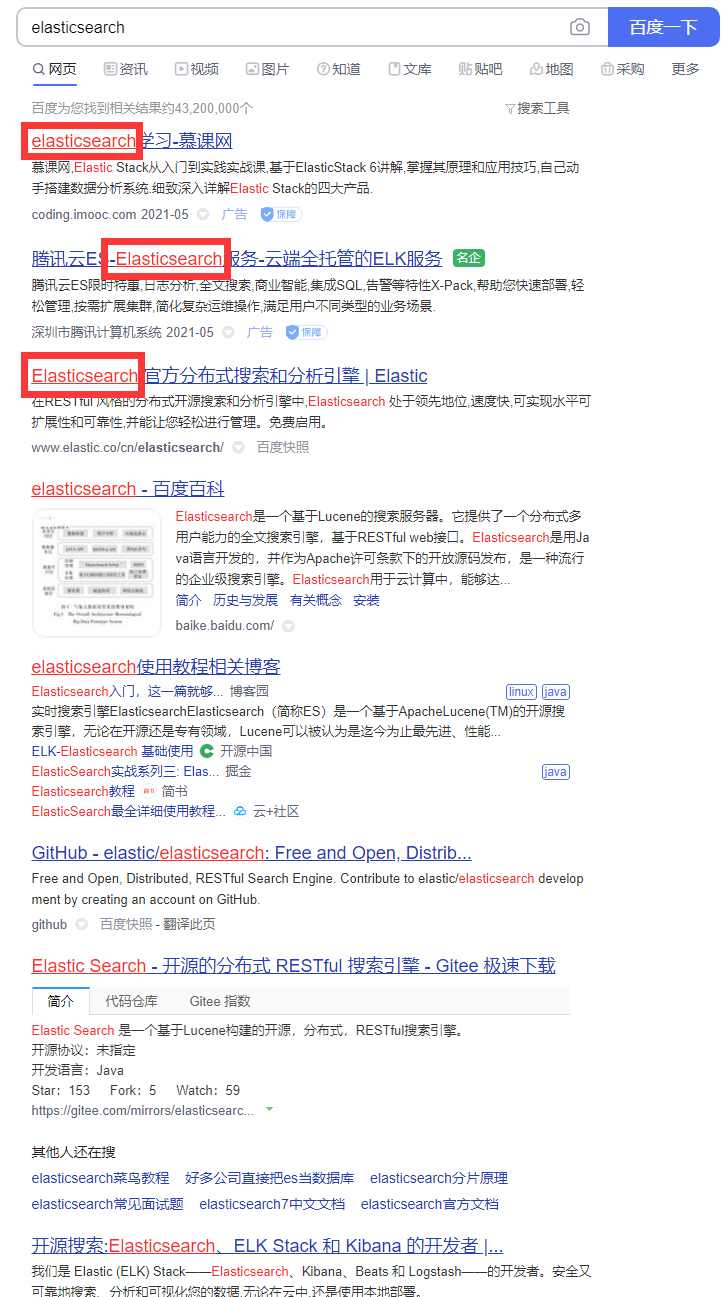
如上图所示,百度对于关键字的查询会是红色字体,高亮进行显示,分数越高的数据越靠前。
GET /products/_doc/_search
{
  "query":{
    "match":{
      "name":"Book"
    }
  },
  "highlight": {
    "fields": {
      "name":{}
    }
  }
}

返回结果:
{
  "took" : 9,
  "timed_out" : false,
  "_shards" : {
    "total" : 1,
    "successful" : 1,
    "skipped" : 0,
    "failed" : 0
  },
  "hits" : {
    "total" : {
      "value" : 2,
      "relation" : "eq"
    },
    "max_score" : 0.744874,
    "hits" : [
      {
        "_index" : "products",
        "_type" : "_doc",
        "_id" : "200040",
        "_score" : 0.744874,
        "_source" : {
          "brand_id" : 1,
          "create_time" : "2021-05-21T00:00:00Z",
          "id" : 200040,
          "last_time" : "2021-05-21T00:00:00Z",
          "long_name" : "HUAWEi Mate Book 13 16G 512G  ",
          "name" : "HUAWEi Mate Book 13",
          "price" : 8888,
          "review_count" : 11111,
          "shop_id" : 1,
          "sold_count" : 12345,
          "status" : 1,
          "three_category_id" : 3
        },
        "highlight" : {
          "name" : [
            "HUAWEi Mate <em>Book</em> 13"
          ]
        }
      },
      {
        "_index" : "products",
        "_type" : "_doc",
        "_id" : "200041",
        "_score" : 0.744874,
        "_source" : {
          "brand_id" : 1,
          "create_time" : "2021-05-21T00:00:00Z",
          "id" : 200041,
          "last_time" : "2021-05-21T00:00:00Z",
          "long_name" : "HUAWEi Mate Book 13 16G 512G  ",
          "name" : "IPhone Mate Book 13",
          "price" : 5499,
          "review_count" : 11111,
          "shop_id" : 1,
          "sold_count" : 12345,
          "status" : 1,
          "three_category_id" : 3
        },
        "highlight" : {
          "name" : [
            "IPhone Mate <em>Book</em> 13"
          ]
        }
      }
    ]
  }
}
2. elasticsearch与mysql数据同步
2.1 go-mysql-elasticsearch简介
go-mysql-elasticsearch是一款开源的高性能的Mysql数据同步ES的工具,其由go语言开发,编译及使用非常简单。go-mysql-elasticsearch的原理很简单,首先使用mysqldump获取当前MySQL的数据,然后在通过此时binlog的name和position获取增量数据,再根据binlog构建restful api写入数据到ES中
注意
-
mysql binlog必须是ROW模式
-
要同步的mysql数据表必须包含主键,否则直接忽略,这是因为如果数据表没有主键,UPDATE和DELETE操作就会因为在ES中找不到对应的document而无法进行同步
-
不支持程序运行过程中修改表结构
安装
- 拉取go-mysql-elasticsearch镜像
docker pull gozer/go-mysql-elasticsearch
- 创建一个目录用于存储配置文件
mkdir /docker/go-mysql-es

cd /docker/go-mysql-es

v go_mysql_river.toml
文件内容如下:
my_addr = "172.17.0.4:3306"    --mysql地址与端口
my_user = "root"               --mysql用户
my_pass = "root"               --mysql密码
my_charset = "utf8"            --字符集
enable-relay = true            --

es_addr = "172.17.0.8:9200"    --es的地址与端口
es_user = ""                   --es用户名
es_pass = ""                   --es密码

data_dir = "/docker/data"      --数据存储目录

stat_addr = "127.0.0.1:12800"
stat_path = "/metrics"

server_id = 1001               --

flavor = "mysql"               --

mysqldump = ""                 --备份文件

#skip_master_data = false

bulk_size = 128                --

flush_bulk_time = "200ms"

skip_no_pk_table = false

[[source]]
schema = "lmrs_2008_shops"     --同步的数据库
tables = ["lmrs_products"]     --同步的表

[[rule]]
schema = "lmrs_2008_shops"     --同步的数据库
table = "lmrs_products"        --同步的表
index = "products"             --同步的es索引
type = "_doc"                  --同步的es类型
# Only sync following columns
filter = ["id", "name","long_name","brand_id","shop_id","price","sold_count","review_count","status","create_time","last_time","three_category_id"]  --哪些字段同步
[rule.filed]
mysql = "three_category_id"  --mysql的three_category_id替换es的category_id
elastic = "category_id"
- 构建go-mysql-elasticsearch容器
docker run -p 12345:12345 -d --name go-mysql-es -v /docker/go-mysql-es/go_mysql_river.toml:/config/river.toml:ro --privileged=true gozer/go-mysql-elasticsearch